Komicak: Unlocking Charm Without Compromising Readability
In a digital landscape often dominated by sterile, minimalist sans-serifs or overly ornate script fonts, finding a typeface that strikes the perfect balance between playfulness and professionalism can feel like searching for a needle in a haystack. This is where Komicak steps in as a refreshing solution. Designed with well-rounded edges and a distinctively friendly character, Komicak isn't just another decorative font; it is a versatile tool that embodies charm without sacrificing legibility. Whether you are a small business owner crafting a logo, a blogger designing an engaging header, or an educator creating materials for young students, understanding how to leverage this unique display font can elevate your visual communication significantly.
However, while the appeal of Komicak is immediate, many designers and content creators make critical errors when integrating it into their projects. These mistakes often stem from a misunderstanding of its specific strengths or an overenthusiastic application that dilutes its impact. By recognizing these common pitfalls early on, you can ensure that your designs remain effective, professional, and visually appealing.
The Allure of Well-Rounded Typography
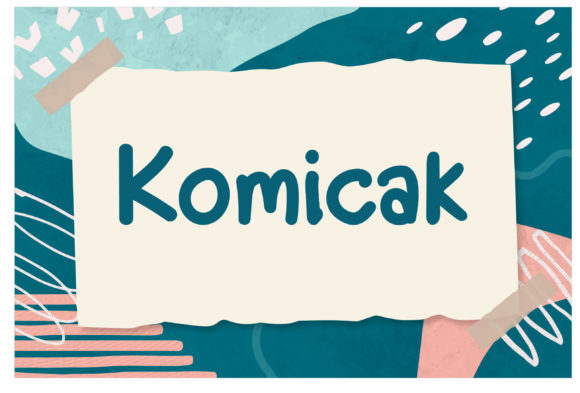
What makes Komicak stand out? Its geometry is not sharp or aggressive. Instead, the characters feature soft curves and generous spacing, which naturally draws the eye and creates a sense of approachability. This "well-rounded" quality is why it has become a favorite for brands looking to humanize their image. Unlike rigid geometric fonts that can feel cold, Komicak invites the reader in. It suggests warmth, creativity, and a lack of pretension.
For entrepreneurs and marketers, this is a powerful asset. When consumers see a brand using Komicak, they subconsciously associate the company with friendliness and reliability. However, this charm comes with a caveat: it must be used correctly. The very features that make it charming—its rounded terminals and playful weight—can lead to readability issues if applied indiscriminately.
Pitfall One: Overusing Display Fonts in Body Copy
The most frequent mistake users make with Komicak is treating it as a body text font. While Komicak is easily readable in headlines, short phrases, and call-to-action buttons, it is generally unsuitable for long-form paragraphs. Because it is a display font, its unique shapes require more cognitive processing than standard serif or sans-serif typefaces. When readers encounter pages filled entirely with Komicak, their eyes fatigue quickly, leading to a poor user experience and higher bounce rates.
To avoid this, reserve Komicak for emphasis. Use it for titles, subtitles, pull quotes, and key labels. Pair it with a clean, neutral font like Helvetica, Open Sans, or Roboto for the main content. This contrast allows the personality of Komicak to shine without overwhelming the reader. Think of it as seasoning in cooking; a little adds flavor, but too much ruins the dish.
Pitfall Two: Ignoring Context and Brand Voice
Another overlooked detail is the context in which Komicak is placed. Because the font exudes such strong friendliness, it can clash with serious or corporate messaging. Imagine a law firm, a financial institution, or a medical practice using Komicak for their primary branding. While it might look cute, it undermines the authority and trustworthiness required in those industries. The font communicates a tone that simply doesn't match the gravity of the subject matter.
Before downloading or purchasing Komicak, ask yourself: does this font align with my brand's core values? If you are running a children's toy store, a bakery, or a creative agency, Komicak is likely a perfect fit. If you are designing a technical manual or a high-end luxury portfolio, you might find that Komicak detracts from the intended message. Always evaluate the emotional resonance of the typeface against the goals of your project.
Evaluating Technical Details Before You Buy
Many beginners rush to download free versions of popular fonts without checking the technical specifications. When considering Komicak, it is crucial to verify the licensing terms and the completeness of the font family. A common issue with display fonts is that they may lack essential characters, such as numbers, special symbols, or extended language support (like accented characters for European languages).
If you plan to use Komicak for international marketing campaigns or e-commerce sites with complex product data, failing to check for full character sets can result in missing glyphs or broken text rendering. This not only looks unprofessional but can also confuse customers. Ensure that the version you select includes all necessary weights and styles, including italics if needed for emphasis, and that the licensing allows for your specific use case, whether that is web, print, or commercial merchandise.
The Danger of Poor Contrast and Size
Even when used correctly in headlines, Komicak can fail if the size and contrast are ignored. The rounded nature of the letters means that at very small sizes, the internal counters (the enclosed spaces within letters like 'o' or 'a') can close up, making the text illegible. Similarly, if the font color is too similar to the background, the soft edges of the characters will disappear, causing the text to blend into the design.
To prevent this, always test your typography at the actual size it will appear on the final medium. If you are designing for mobile devices, ensure that Komicak remains clear on smaller screens. Additionally, use high-contrast color pairings. Dark text on a light background or vice versa ensures that the unique shape of each character is visible. Avoid placing Komicak on busy, textured backgrounds unless you add a solid backdrop behind the text to maintain clarity.
Maximizing Efficiency and Quality
Using Komicak effectively is about strategic placement rather than constant repetition. For freelancers and educators, time is money. Spending hours trying to force a display font to work in situations where it doesn't belong leads to frustration and wasted effort. By adhering to the rule of restraint, you save time and produce higher-quality results.
Consider the hierarchy of your design. Let Komicak take center stage where attention is needed most. For example, in a blog post, use Komicak for the main headline to grab interest, but switch to a highly readable sans-serif for the article body. In a presentation deck, use it for slide titles to set a creative tone, but keep bullet points simple and clean. This approach guides the viewer's eye naturally through the content, improving comprehension and retention.
Furthermore, do not underestimate the power of pairing. The success of Komicak often depends on what it sits next to. Since Komicak is so distinctive, it pairs exceptionally well with understated, geometric fonts. This combination creates a balanced composition where the fun element of Komicak is highlighted by the stability of its partner. Experiment with different combinations to find the harmony that best suits your specific project needs.
Final Thoughts on Making the Right Choice
The sky is indeed the limit when it comes to Komicak, but only if you respect its limitations. It is a tool designed to bring joy and clarity to specific parts of your design, not a catch-all solution for every typographic challenge. By avoiding the trap of overuse, respecting the context of your brand, and paying attention to technical details like character sets and sizing, you can harness the full potential of this charming typeface.
Take the time to review your current projects. Are there areas where a touch of Komicak could inject life and personality? Or are there places where a simpler font would serve your audience better? Making informed decisions about typography is a hallmark of professional design. With Komicak, you have a font that promises friendliness and versatility; now, it is up to you to apply it with wisdom and precision to achieve the best possible results.